//A scripting language that reads like Rust
Rust Augmented With Rust
Rawr has Rust’s structs, enums, traits and match, checked up front with rustc-style errors. Your program stays Rust; the parts you want to change while it runs are written in Rawr.
The rawr crate is the language, and any Rust program can embed it. A shell gives it a domain. The first one, rawr-iced, runs native iced apps that reload in about 0.2 s.
enum Item {
    Book { price: f64 },
    Coffee { cups: i64 },
}

trait Priced {
    fn price(&self) -> f64;
}

impl Priced for Item {
    fn price(&self) -> f64 {
        match self {
            Item::Book { price } => *price,
            Item::Coffee { cups } => 3.5 * (*cups as f64),
        }
    }
}

fn total(items: &[Item]) -> f64 {
    let mut sum = 0.0;
    for item in items {
        sum += item.price();
    }
    sum
}

fn main() {
    let cart = vec![Item::Book { price: 20.0 }, Item::Coffee { cups: 2 }];
    println!("total: {}", total(&cart));
}impl and fn total are the same bytes. Only the ending differs: Rust needs a fn main that prints, while a Rawr script runs its statements from the top and hands its last expression back to the Rust program that evaluated it.
Left: a complete Rust 2024 program; stable rustc compiles it without warnings and it prints total: 27. Right: the SCRIPT string in examples/cart.rs, which cargo run --example cart evaluates to 27.
//Shells
A language, then a shell for a domain
The language core knows nothing about windows or widgets. It parses, checks and runs Rawr inside whatever Rust program embeds it.
A shell gives it a domain: the types, the commands and the reload loop. iced is the first shell; rawr-iced is Rawr for iced apps.
rawr | The language. Embed it in any Rust program with Engine::new().eval. Builds on stable Rust 1.91 or newer. |
rawr-iced | The first shell, for iced apps: reload on save in about 0.2 s, rustc-style errors, your Rust crates imported with no bindings, #[preview] views and PNG snapshots, and the ?play bot and playground. |
use rawr::Engine;

const SCRIPT: &str = r#"
… the Rawr script above …
"#;

fn main() -> Result<(), Box<rawr::EvalAltResult>> {
    let total = Engine::new().eval::<f64>(SCRIPT)?;
    println!("total: {total}");
    Ok(())
}//Install
Install from git
The language is an ordinary crate. It builds on stable Rust 1.91 or newer.
The iced shell is more demanding. It runs on Apple Silicon Macs for now and needs one pinned Rust nightly, nightly-2026-07-11, with the rustc-dev and rust-src components. Rawr builds iced and your own crates with that toolchain too.
Embed the language
cargo add --git https://github.com/airstrike/rawr rawrThen Engine::new().eval::<T>(script), as in examples/cart.rs above.
The iced shell: toolchain, CLI and import driver
rustup toolchain install nightly-2026-07-11 --component rustc-dev,rust-srccargo +nightly-2026-07-11 install --locked --git https://github.com/airstrike/rawr rawr-clicargo +nightly-2026-07-11 install --locked --git https://github.com/airstrike/rawr rawr-import --features rustc-driverrawr-cli installs rawr. rawr-import installs rawr-import-driver next to it, which reads your Rust crates for imports. The first rawr run compiles iced, so it takes a few minutes; later launches reuse that build.
Start an iced project
rawr new hello && cd hello && rawr runrawr new writes one file, src/main.rawr, a counter. There is no manifest until you want one. Edit it while the window is open.
//The iced shell
Write iced. Reload it like a script.
rawr-iced runs native iced apps written in Rawr, with the same impl Widget<Message>, the same column![], the same match, against iced master.
Save a .rawr file and rawr run reloads it in about 0.2 s. The window stays open and keeps its state.
use iced::Center;
use iced::widget::{Widget, button, column, text};

pub fn main() -> iced::Result {
    iced::run(Counter::update, Counter::view)
}

#[derive(Default)]
struct Counter {
    value: i64,
}

#[derive(Debug, Clone, Copy)]
enum Message {
    Increment,
    Decrement,
}

impl Counter {
    fn update(&mut self, message: Message) {
        match message {
            Message::Increment => {
                self.value += 1;
            }
            Message::Decrement => {
                self.value -= 1;
            }
        }
    }

    fn view(&self) -> impl Widget<Message> {
        column![
            button("Increment").on_press(Message::Increment),
            text(self.value).size(50),
            button("Decrement").on_press(Message::Decrement)
        ]
        .padding(20)
        .align_x(Center)
    }
}main.rawr. The diff is the file extension and the command that runs it.
Left: examples/counter from iced master at be88873d, with its test module left out. Right: those exact bytes, which rawr check accepts unchanged.
//iced shell · Commands
One command for each part of the loop
Everything works on a project directory or a single file. Run rawr --help for the full grammar.
rawr run | Opens the app. Saving a .rawr file reloads it in place; changing your Rust crates rebuilds them natively. |
rawr check | Type-checks without a window and reports errors the way rustc does. |
rawr check --as-rust | Copies the project under target/ with .rawr renamed to .rs and runs cargo check on it. |
rawr preview | Opens a view marked #[preview] on its own. ← and → step through a group. |
rawr snapshot | Renders every preview headlessly to PNG; --check compares them with the committed ones, --update accepts new ones. |
rawr mcp | An MCP server that lets a coding agent list and render previews, run checks and screenshot the running window. rawr init --claude --codex registers it. |
rawr doctor | Reports on the environment and the project. |
//iced shell · Diagnostics
Errors you already know how to read
Delete the Decrement arm from the counter and rawr check answers the way rustc would: the code, the span, and what is missing.
error[RAWR-RESOLVE-MATCH]: invalid match for `Message`: non-exhaustive patterns; missing Message::Decrement
 --> src/main.rawr:21:9-25:9
 21 |         match message {
    |         ^^^^^^^^^^^^^^^
    | ...
 25 |         }
| ^^^^^^^^//iced shell · Rust imports
Your own Rust crates, with no bindings
List a crate in rawr.toml and use it. Rawr reads only the items your code touches, so a custom native widget in a Cargo crate is just another widget.
This is gallery_ui::Dial from RawrGallery, an ordinary iced Widget written in Rust and driven from dial.rawr.
[rust.dependencies]
gallery_ui = { package = "gallery-ui", path = "rust/gallery-ui" }use gallery_ui::Dial;
let face = container(Dial::new(self.value, Message::Turn).range(0..=100))
.padding(LOOSE)
.style(inset);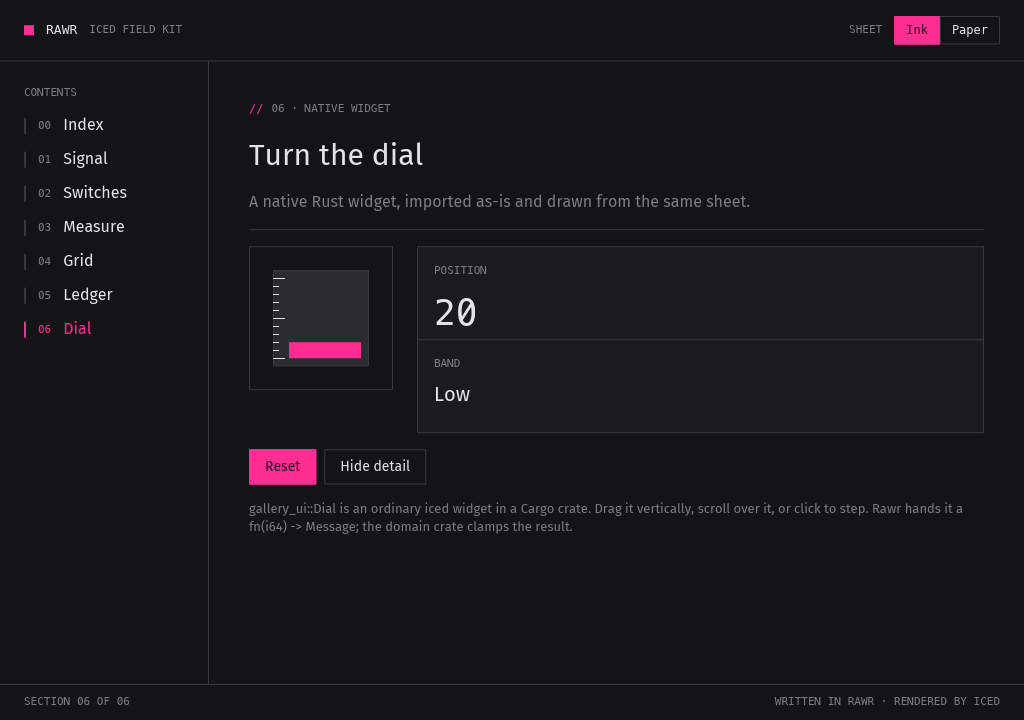
rawr snapshot.//iced shell · ?play
Render a snippet in Discord
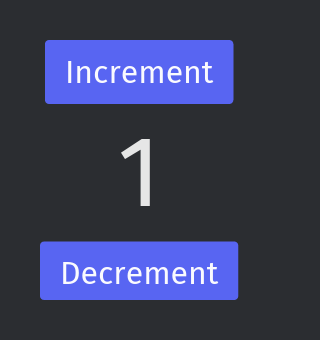
In a Discord channel where the bot is turned on, write ?play over a code block with a view or a whole app, and it replies with the frame. The playground does the same in a browser, nothing to install.
?play 160x170 msg=Message::Increment
```rust
use iced::Center;
use iced::widget::{Widget, button, column, text};
// … the rest of the counter
```
The iced counter above after one Increment, as rawr-play, the renderer behind the bot, draws it.
//Status
Pre-alpha, plainly
Rawr is early. The language crate builds on stable Rust. The iced shell runs on Apple Silicon Macs, follows iced master, and pins one nightly. APIs, commands, file formats and error codes will change without notice.
It covers a lot of Rust but not all of it. When Rawr rejects valid Rust that it claims to cover, that is a bug, and a small reproduction is the most useful report.